Updated · Zombie Love Story AI
What should I check if the faces change?
Compare each person with their original portrait, check the survivor and zombie role labels, then pause before and after the warm memory. Zombie makeup becoming healthy skin is an intended story change; replacing one person with a different-looking character is not. A change in lighting alone does not establish an identity change.
This guide helps you identify the problem and choose a next step. The website has no face-lock control, frame editor or repair button for a completed video. Reference photos guide the model; they do not guarantee an exact likeness or a successful paid retry.
Compare a real present-to-memory transition
These frames come from the published Rain sample, made with two AI-created fictional adults. They illustrate the change in makeup and light, rather than a measured test of real-person likeness.
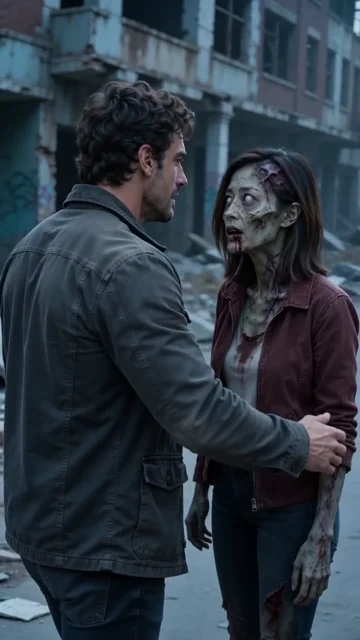
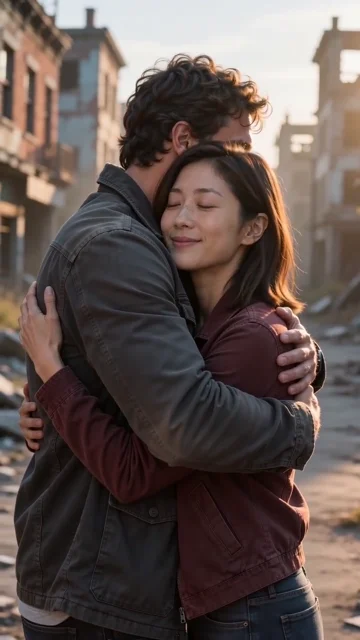
The dark survivor jacket and burgundy partner jacket give you another way to track the roles. Pause the original MP4 around 8.5 seconds and again near the end. A still cannot establish movement or identity throughout the clip: compare the input portraits and full sample.
Changed face, wrong role or an unclear flashback?
The face looks like a different person
Compare clear views of the face with the original reference, rather than judging a blurred frame or a single expression. Check facial proportions, hairline and recognizable features across several shots. If the reference is too small or covered, replace it before a future submission. Clearer references still cannot guarantee likeness.
The wrong person becomes the zombie
Before submitting, read the labels under both previews. Survivor Photo should stay human; Zombie Partner Photo should change in the present. Use Swap roles if the previews are reversed. If the labels were correct but the result reverses them, that is a generated role mismatch; swapping previews afterward does not change the completed MP4.
The memory looks like a different couple
Compare the last clear present-day shot with the first clear memory shot. Track each face, jacket, relative position and arm placement separately. A background or color change is expected; a new face, unexplained third person or abruptly changed clothing is a continuity problem. Healthy skin in the final scene means a memory, not a cure in the present.
What can I change before generating?
- Choose one sharp, well-lit portrait per consenting adult, with the face visible. Avoid group photos, distant faces and heavy coverings.
- Check both photo previews and the final role labels. The two images are character references, not opening and ending frames.
- Review the photo requirements and published sample limitations before deciding whether this fixed story fits your goal.
On this website, the four-scene prompt is built in. You cannot paste a different prompt, choose Station or Coast as a scene, or edit a finished shot. If you are adapting the idea in another compatible editor, our prompt guide shows explicit character roles. Check that editor’s reference inputs first; adding more prompt words is not a verified repair.
What if I already paid and the result is wrong?
Open My orders in the same browser and check the original task. Keep the order reference and note the affected timestamps. A pending generation or safety review is a delivery state, not evidence that the faces failed; playback remains locked until approval. Do not pay again to check an existing task.
A completed video with likeness or other quality concerns is reviewed individually under the refund policy. Submit a review request within seven days of payment. A quality concern does not automatically qualify for a refund, and another generation is not a free repair. One attempt costs $4.99 USD before applicable tax. Access expires 24 hours after generation completes, including time spent in human review; read the missing or expired download steps if that is the problem you need to solve.